CLICK HERE FOR FREE BLOGGER TEMPLATES, LINK BUTTONS AND MORE! »

Tuesday, May 21, 2013

Pet Shop Prices! A QR code activity


WOW!  Time is FLYING!  There are just days left with my sweet kiddos, and it has been busy, busy, busy!  It’s been way too long since I’ve posted last so I’m happy to be finally blogging again! 

We just wrapped up our 3rd grade economics sale last week, and our super 9 & 10-year olds raised a whopping $1,000+ to donate to the local food bank!  It was quite the project and they did a super job!  The kids learned so much about marketing, packaging, and income and expenses.  It was also the perfect opportunity to loop back and practice MONEY MATH! J  We added totals, reviewed ways to count coins accurately, and practiced strategies for making change.  LOTS of learning went into that one day sale!

I put together a few money math centers for this, and Pet Shop Prices was one of the kids’ favorites for sure!  


After being inspired by some SUPER CUTE pet clip art, I came up with a pet shop theme for adding dollar amounts with accuracy.  Students are basically “running the shop!”  Using a “price sign” for items in the store, they fill out dollar amounts on their student receipt sheet.  They add the totals and double check to make sure that they are correct.  THEN….the fun part:  they use an iTouch, iPad, or smartphone and QR code app as a price “scanner” to see if they were right.  They were HOOKED!


I’ve posted Pet Shop Prices here on my TPT store.  It includes the Pet Shop price sign, a student reproducible sheet with 8 “receipts” for them to solve.  There are self-checking QR codes on each receipt.  There are also paper price check cards to print out and use if QR code reader technology isn’t handy. 
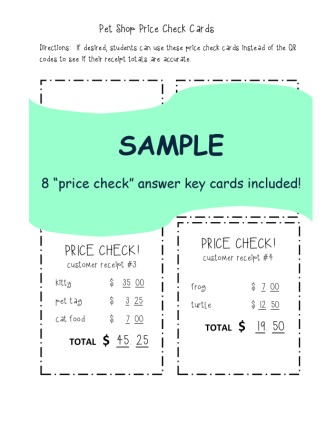
We had so much fun with this, so I hope you’ll take a look and check it out!  Hope you are enjoying these last few days of school and gearing up for a relaxing summer!  J

More soon,

Melissa

Sunday, April 28, 2013

Character Trading Cards


Woohooooooo!  State testing wrapped up this week!  Kiddos and teachers everywhere have lots to be proud of! J  Big….sigh….of….relief!

We have a little more than a month to go on our campus, and I’m looking forward to making those last days of school really count!  One thing’s for sure, I want to keep my students reading, reading, reading through the rest of the school year and well into the summer.  If you’re looking for fun ways to do this too, I’ve got a GREAT tool for you:  Trading Card Creator!


This fun FREE online tool comes from ReadWriteThink.org, the website of the International Reading Association.  It lets kids create a virtual trading card where they describe a character’s feelings, actions, and more—all based on the text they’re reading.  Students can upload images, save and even print their double-sided trading cards for sharing.  What a great way to have kiddos talk about the books they love and spread their excitement! 

You can access the card creator here, or there’s even a FREE iPad app.  Both the app and website are excellent!  


This web tool is really versatile, so you can even have kids create trading cards of events, story settings, abstract concepts of more.  Lots to explore with the Trading Card Creator, and this is just ONE of the super activities on ReadWriteThink.org. 

My kids LOVE making these, and have a blast trading them!  What a fun way to keep that learning going through the last days of school!

I’m dabbling here and there with some other great end-of-year activities to keep the kids engaged and learning—I’ll be blogging about those later this week!

Have fun trading! J

Melissa

Sunday, March 24, 2013

Easter Egg Math Challenge!


Looking for something math-y to do this week?  I’ve got a fun activity to share!

Call me goofy, but don’t you just love those little plastic Easter eggs that are EVERYWHERE right now?  They’re inexpensive, come in all kinds of colors and designs, and are just plain fun—so I had to find some ways to pair them with learning!  I’ve got a few things in the hopper (unfortunately down to the wire with Easter just a week away), and am hoping to crank them out in the next day or two.  I finally sat down today to finish at least one.  Here it is—the Easter Egg Math Challenge!

\


With this math problem-solving EGGStravaganza,  learners solve story problems, then check inside a matching plastic egg to confirm their answers!  Simply copy, cut, and tuck the answer slips into 8 plastic numbered eggs—it’s ready to go!  It includes 8 higher-level math questions, and I’ve also included blank question and answer templates so that students can write their own questions too! 


I use this as a math center, and put all the answer eggs in a cute little Easter basket and the student recording sheets nearby.  My kiddos LOVE this activity, and the simple peeking into the eggs to see if they’re right!  It’s a great review of math concepts such as elapsed time, area & perimeter, number patterns, multi-step operations, and more!  A fun math center, partner activity, or whole group review.  It’s math critical thinking combined with Easter basket fun!  Hop on over to TPT to check out the preview! 

Melissa

Tuesday, March 5, 2013

Too Noisy?


It’s probably happening in just about every classroom in America this week:  spring break fever!  The students know it’s coming…the teachers know it’s coming…and everyone is ready for a few days of vacation!  And with all this excitement often comes an increase in chattiness!  I’m definitely a teacher that encourages kids to talk about their ideas and problem solve with their peers in class, but sometimes we all get a little TOO loud!

This week I think I found a solution.  Better yet, it’s a FREE solution!  It’s a genius app called Too Noisy!  This wonderful tool uses a visual meter to signal kids when the classroom is becoming too loud.  A yellow sky warns that the decibels are climbing, and a black stormy sky tells students that they’ve passed the noise threshold!  I like that you can adjust the sensitivity according to the situation and environment too!

Just right!

Getting loud!
TOO noisy!
I use it by opening the app on my iPad, and putting it under the document camera in my class.  It’s a big enough display to even just put the iPad at the front of the room for students to see.  Small groups could even take an iTouch with the app as a great reminder!  Too Noisy is available on both iPad and iPhone, so there’s nice flexibility.

I used it yesterday when a group of 8 kiddos practicing Reader’s Theater got a little bit too loud.  With it, they were able to work much more quietly--in the hallway no less!  I used it today when we were packing up for the day.  It’s such a simple way to give kiddos feedback on how loud their voices should be.  I’m a fan! 

Again, this app is FREE but for $1.99 a few more bells and whistles such as different background themes and a counter that tracks how many times the noise meter has reached its peak.  Check it out in the app store or at toonoisyapp.com.

Hang in there kids!  Hang in there teachers!  Spring break is just around the corner! This tool might just help a little bit in the meantime!  J


Melissa

Saturday, March 2, 2013

Spelling Speedway!


Looking for something fun to add to your class word work routine?  Wish that your students practiced spelling more frequently?  The 3rd graders in my class work on their spelling words daily, but I feel like I’ve been in a bit of a rut these last few weeks in the word activity choices they have.  I’ve been trying to think of some new ways to make word work FUN, and had some inspiration finally hit!
Can’t wait to introduce this new game to the kids this week:  Spelling Speedway!


This racecar-themed game gives students an exciting way to practice their spelling words while racing head-to-head with their partner!  Using the spelling patterns that they are working on, players spin the word spinner, find what pattern they need to spell, then fill in correctly-spellled words along the “lanes” of their Spelling Speedway board.  Partners have to check their peer’s spelling for the words to count, and there are even “Pit Passes” on the spinner that allow the kids to choose what pattern they spell on their board.


I’ve posted the set on my Teachers Pay Teachers site, so be sure to take a look! It includes 3 different spinner and gameboard versions so that you can easily tweak the one used based on the spelling list that a child is working on.  Works with ANY spelling list (2, 3 or 4 patterns), and super easy to differentiate!  Along with the teacher directions, I’ve also included a student-friendly version of game instructions so that kids can quickly set up the game and start playing!

Looking forward to adding this to my literacy stations this week, and hoping that kids will “race” to it. J


Melissa